Research / Sessions & authentication
What a password change must actually do
Changing a password is not a form submission. It is a revocation event, and a system that leaves old sessions alive after it has not really changed the password at all.
People change their password for one reason above all others: they think someone else might have it. That makes the password change the exact moment when the system must assume an attacker is present and cut off every session the attacker could be holding. A change that updates the stored credential but leaves existing sessions valid does the paperwork and skips the point.
We have found this in production: a password could be changed, and a session captured beforehand kept working afterward. The user did everything right. The system quietly kept the attacker logged in.
The system assumption
The assumption is that a password and a session are the same fact, so updating one updates the other. They are not the same fact. A password is a long-lived secret used to prove identity at login. A session is a separate token, minted after login, that stands in for the password on every subsequent request precisely so the password is not resent each time. Once issued, a session lives its own life. Changing the password changes how future logins are authenticated. It does nothing, on its own, to the sessions already walking around.
Where the assumption breaks
It breaks whenever a session outlives the credential that created it. The dangerous case is the one the user is specifically trying to defend against. Suppose an attacker has obtained a valid session, by capturing a token, using a shared or public machine, or any of the ways sessions leak. The user suspects something is wrong and changes their password. In their mental model, they have just locked the attacker out. If the system does not invalidate existing sessions on password change, the attacker's session sails straight through the reset, still authenticated, now against an account whose owner believes it is secure. The reset became theater.
Reconstructing it
The whole failure fits on a timeline.
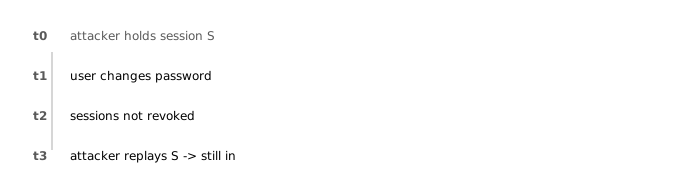
Nothing exotic happens here. There is no bypass and no injection. The failure is an omission: the change-password routine never told the session layer that every session for this account is now suspect.
Why the obvious defenses didn't solve it
Requiring the current password to change it. A good control against a stranger changing the password. Useless here, because the attacker is not changing the password. The legitimate user is, and the attacker is content to keep using the session they already have.
Strong password policy. Length and complexity affect how hard the password is to guess. They have no effect on a session that was already issued. A perfect new password protects the next login, not the current attacker.
Session expiry. An idle or absolute timeout will eventually end the attacker's session, but "eventually" is measured in hours or days. The user acted now, expecting now. A timeout is not revocation.
Root cause
The root cause is that a security-relevant state change (the password reset) was not wired to the security state it should govern (the set of live sessions). Credential changes and session lifetime were designed as separate features and never connected. The correct model treats certain events as revocation triggers: a password change, an account-compromise report, a role or permission change, an explicit "log out everywhere." Each must invalidate the sessions it implicates, atomically with the change itself, so there is no window in which the credential is new and the old access still works.
How to test for this class of failure
- Log in as a user in two places and capture both sessions. Change the password in one. Then use the other. If it still works, the sessions outlived the credential.
- Test the same for related events: an admin resetting the user's password, an account lock, a role downgrade, and a "log out all devices" action if one exists. Each should revoke.
- Confirm the revoked session is dead server-side, not just cleared from the browser. Replay the captured token directly. A session invalidated only by deleting a client cookie is not invalidated.
- Check that the acting user's own session behaves sensibly (typically kept or reissued) while every other session for the account is killed.
How to design the control correctly
- Make password change a revocation event. On change, invalidate all sessions for the account server-side, then issue a fresh session for the acting user so they are not logged out of the device they are using.
- Revoke on the server, not the client. Sessions must be terminable centrally, whether that is a server-side session store or short-lived tokens tracked against a revocation list. A stateless token you cannot revoke is a token you cannot secure at this moment.
- Give users "log out everywhere." Someone worried about compromise needs a single action that ends every session now. It is the same mechanism the password change should already trigger.
- Extend the trigger set. Treat email changes, MFA changes, role changes, and compromise reports as revocation events too. The principle is that when trust in an account materially changes, its existing sessions should not be assumed to still deserve it.
What we took away from it
This finding is a small amount of code and a large amount of meaning. The user's password change is a message: "I think I am compromised, make it stop." Honoring that message is not about the strength of the new password. It is about severing the access the old one may have leaked. A system that treats the reset as a database update, rather than as the revocation event the user intended, hands back exactly the safety the user just tried to reclaim.
For us it reinforced a habit: when we test authentication, we do not stop at "can you log in." We test what happens to existing access when trust changes, because that is where the user is quietly depending on the system to do the right thing without being asked twice.
References
- OWASP: Session Management Cheat Sheet
- OWASP ASVS v4: V3 Session Management
- CWE-613: Insufficient Session Expiration
- NIST SP 800-63B: Digital Identity Guidelines, Authentication
Internal evidence: Kahu Labs Research, anonymized authorized assessment (2025). Client, target and identifying details are withheld; see our research policy.